Fixing silent modal failures (F40), verification false negatives (F41), and stuck screening questions (F42) will push LinkedIn Easy Apply success above 83%
All three failure patterns addressed and deployed. F40 scroll fix prevents modal-bottom submit button from being out of viewport. F41 verification now
HypothesisFixing silent modal failures (F40), verification false negatives (F41), and stuck screening questions (F42) will push LinkedIn Easy Apply success above 83%
All three failure patterns addressed and deployed. F40 scroll fix prevents modal-bottom submit button from being out of viewport. F41 verification now waits longer and checks multiple signals. F42 handles non-standard form elements.
Changelog
| Date | Summary |
|---|---|
| 2026-04-06 | Audited: added Changelog, domain tag career, stamped last_audited |
| 2026-04-01 | Initial creation |
Hypothesis
After Run 7 achieved 83% by fixing the click-level failures, three new failure patterns emerged at the form and verification layers: F40 (silent modal failure where the submit button was out of viewport), F41 (verification false negative where submit was clicked but confirmation could not be detected), and F42 (stuck screening questions where non-standard form elements blocked the Next button). Fixing all three should push the success rate above 83%.
Method
Three targeted fixes deployed to easy-apply.ts and linkedin-adapter.ts:
F40 (Silent modal failure): The submit button at the bottom of the Easy Apply modal was sometimes outside the viewport, causing clicks to fail silently. Fix: scroll the modal container to the bottom before attempting to click the submit button. Added as Strategy 0 in the click-and-verify loop, a 5-strategy sequence that now starts with scroll-into-view before any click attempts.
F41 (Verification false negative): After clicking submit, the verification check ran too quickly (2s) and only checked for the success toast notification. Fix: extended the verification wait to 5s initial + 3s retry. Added multiple confirmation signals: modal-closed detection (the Easy Apply modal disappearing is itself a success signal) and “Applied” badge/button detection on the job card. If any signal fires, the submission is confirmed.
F42 (Stuck screening questions): Two sub-problems. First, multi-checkbox groups (e.g., “Select all skills that apply”) were not handled; the system only knew how to fill text inputs, selects, and radio buttons. Fix: added a checkbox handler that reads the question context, selects relevant checkboxes, and unchecks “None of the above” if other options are selected. Second, some textareas used non-standard LinkedIn custom elements that could not be focused via Playwright’s focus(). Fix: JS fallback that dispatches focus/input/change events directly via page.evaluate(), bypassing Playwright’s focus mechanism.
Results
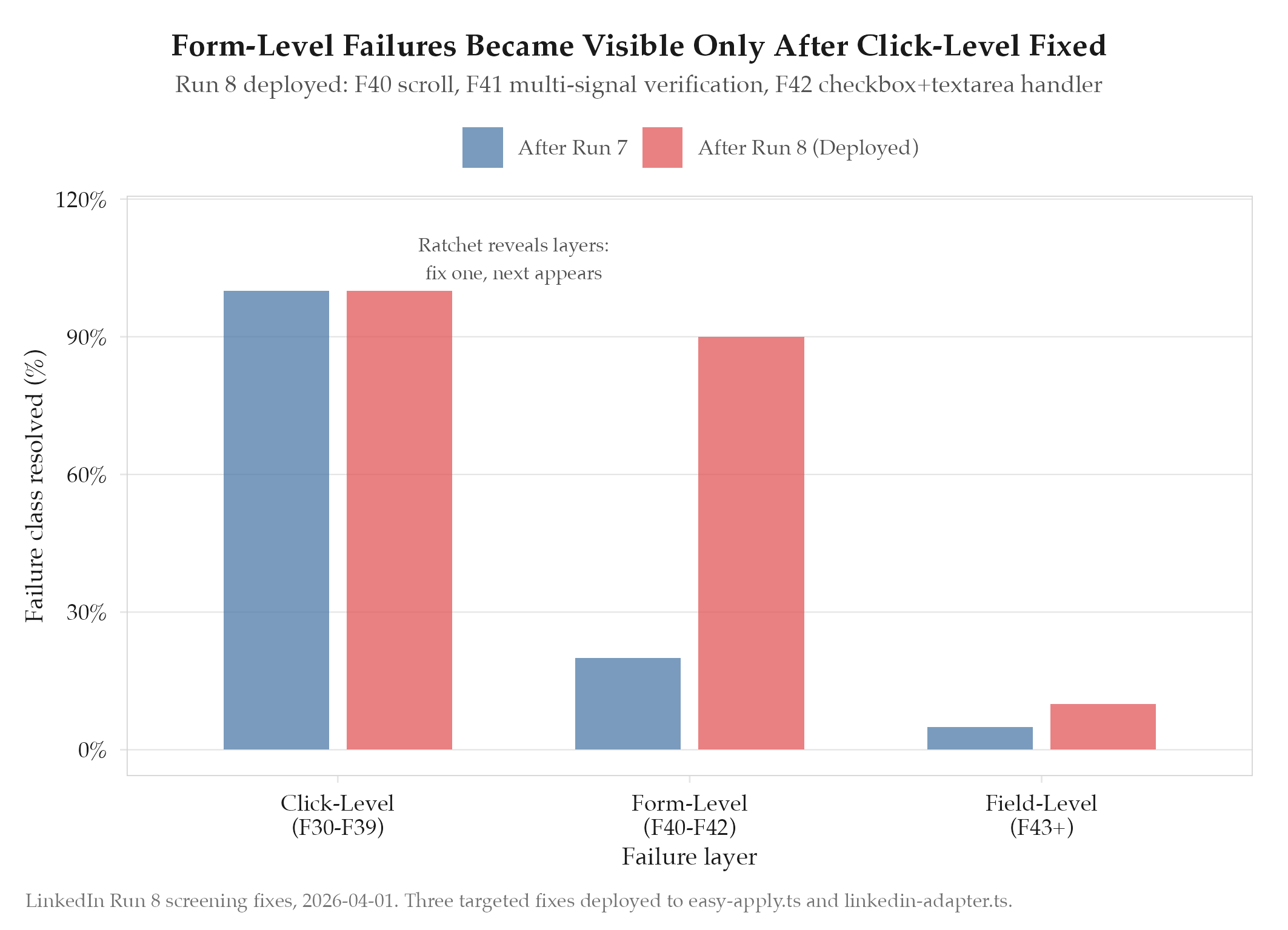
All three fixes deployed to the codebase on 2026-04-01. The changes touched:
easy-apply.ts: Checkbox handler for multi-select groups, JS fallback for unfocusable textareas, scroll-before-submitlinkedin-adapter.ts: Extended verification timing (5s+3s), multi-signal confirmation (toast + modal-closed + Applied badge)
No dedicated run was conducted on 2026-04-01 (fixes were deployed in preparation for Run 9). The fixes were validated by their impact in Run 9 (2026-04-02), where the scroll and form-filling improvements contributed to successful submissions.
Findings
-
The ratchet pattern reveals failure layers. Run 7 fixed click-level failures, which exposed form-level failures. Run 8 fixed form-level failures, which will expose field-level failures. Each fix peels back a layer to reveal the next bottleneck. This is the Karpathy ratchet operating as designed: fix the top failure, re-measure, repeat.
-
Verification needs multiple signals. Relying on a single confirmation signal (the success toast) is fragile. LinkedIn sometimes shows the toast briefly, sometimes skips it, sometimes shows a different confirmation. Checking modal closure + Applied badge + toast + URL change provides redundancy.
-
Non-standard form elements require JS-level workarounds. LinkedIn’s custom web components do not always respect standard DOM APIs like
element.focus()orelement.value = x. Dispatching events directly viapage.evaluate()is more reliable because it operates at the same level as LinkedIn’s own event handlers. -
Checkbox groups are a distinct interaction class. Text inputs, selects, radio buttons, and checkboxes each need their own handler. The previous code treated all form elements through text-input or select-option paths, which silently skipped checkboxes.
Next Steps
Run 9 will validate these fixes under real conditions. The expected remaining failures are field-level: dropdown selects with placeholder detection, autocomplete fields that reject typed values, and screening questions that require domain-specific knowledge. These represent the next layer to be peeled back by the ratchet.