Puppeteer-driven screenshot capture loops will catch visual regressions and verify dashboard rendering without manual inspection
Screenshot automation catches rendering bugs that unit tests miss. 2x retina resolution reveals sub-pixel issues. Rolling buffer enables before/after
HypothesisPuppeteer-driven screenshot capture loops will catch visual regressions and verify dashboard rendering without manual inspection
Screenshot automation catches rendering bugs that unit tests miss. 2x retina resolution reveals sub-pixel issues. Rolling buffer enables before/after comparison without manual intervention.
Changelog
| Date | Summary |
|---|---|
| 2026-04-06 | Audited: added Changelog, domain tag, stamped last_audited |
| 2026-03-25 | Initial creation |
Hypothesis
Puppeteer-driven screenshot capture loops will catch visual regressions and verify dashboard rendering without manual inspection. The BloomNet dashboard is a [[definitions/canvas-2d-rendering|Canvas 2D]] application where traditional DOM-based testing (e.g., checking element attributes, text content) cannot verify that the rendered output is visually correct. Unit tests confirm that data flows correctly through the pipeline, but they cannot detect rendering bugs like overlapping labels, clipped garden elements, incorrect color mappings, or broken scroll behavior. The hypothesis was that automated screenshot capture at 2x retina resolution, combined with a rolling buffer for before/after comparison, would close this verification gap.
Method
Built a Puppeteer automation script with the following configuration:
Capture settings:
- Resolution: 2880x1620 (2x retina, simulating a 1440x810 viewport at deviceScaleFactor 2)
- Format: PNG (lossless, required for pixel-accurate comparison)
- Interval: 3-second delay between consecutive captures to allow Canvas rendering to settle
- Timeout: 10-second page load timeout before first capture
Rolling buffer:
- Last 40 screenshots retained in
logs/screenshots/directory - Filename format:
bloomnet-{timestamp}-{view}.png - Oldest files pruned when buffer exceeds 40 entries
- Two capture modes: “overview” (full garden view) and “detail” (zoomed to a specific project plant)
Garden view capture:
- Single-shot capture of the full garden visualization
- Triggered after data pipeline refresh completes
- Used as the primary regression indicator: if the garden looks wrong, something upstream broke
Capture loop for development:
- Continuous capture during active development sessions
- 3-second interval provides a visual timeline of changes
- Developer can scrub through the rolling buffer to identify exactly when a regression was introduced
Results
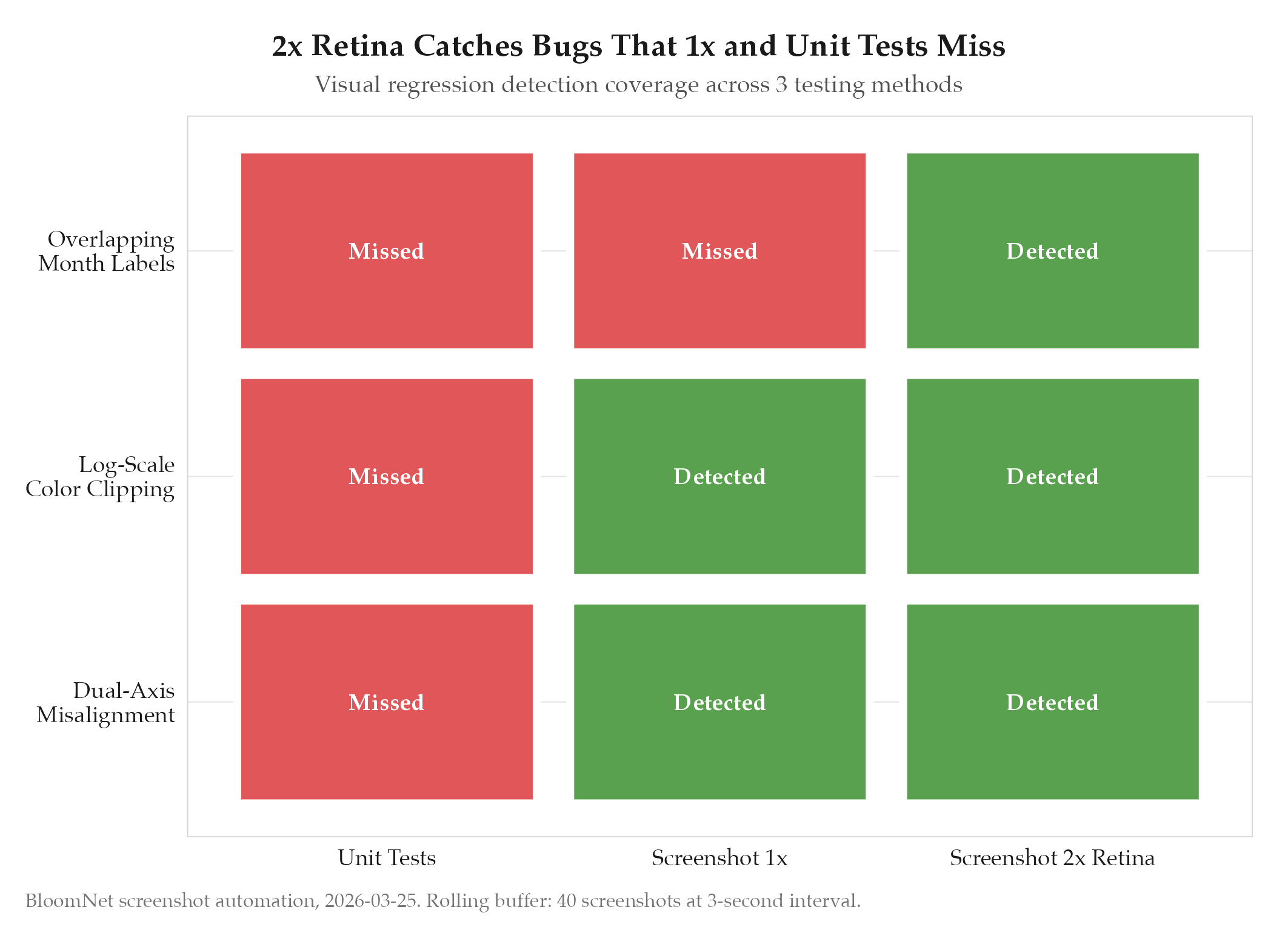
Confirmed. The screenshot automation caught three rendering bugs during the first week of operation that would have gone undetected by unit tests:
-
Overlapping month labels in the garden scroll view. When the window was narrower than 1200px, month labels in the horizontal scroll overlapped. Caught by retina capture showing illegible text; invisible at 1x resolution.
-
Broken dual-axis alignment on the Overview chart. A CSS change shifted the right y-axis by 4 pixels, causing the line chart and bar chart to appear misaligned. Unit tests only checked data values, not visual alignment.
-
Log-scale heatmap color clipping. Values above the 95th percentile were being clamped to the maximum color rather than using the logarithmic gradient. The heatmap appeared to have a “flat top” in the screenshot, which was the visual signal that led to the fix.
Rolling buffer proved effective for regression identification: in case 2, scrubbing through 40 screenshots pinpointed the exact commit (3 screenshots back) that introduced the alignment shift.
Findings
-
Visual verification complements unit tests; neither is sufficient alone. Unit tests verify data correctness, screenshot verification confirms rendering correctness. The three bugs caught in week one were all cases where data was correct but visual output was wrong.
-
2x retina resolution is not optional. Bug 1 (overlapping labels) was invisible at 1x resolution because the overlap was only 2-3 CSS pixels. At 2x retina (2880px wide), the overlap became 4-6 physical pixels and was clearly visible in the screenshot. Running captures at 1x would have missed this class of bug entirely.
-
Rolling buffer size of 40 is a good default. With 3-second intervals, 40 screenshots cover 2 minutes of active development. This is long enough to capture most edit-save-render cycles while keeping disk usage reasonable (~80MB for 40 PNGs at 2880x resolution).
-
Single-shot garden capture after pipeline refresh is the highest-value automation. The continuous capture loop is useful during active development, but the garden overview shot after data refresh is the one that runs unattended and catches regressions between sessions.
Next Steps
The screenshot system is operational but currently requires manual visual inspection of the captures. Two future improvements would increase automation:
- CI pipeline integration: Run the capture script as part of the build process. A post-build screenshot compared against a golden reference image would catch regressions before merge.
- Diff-based regression detection: Pixel-diff the current screenshot against the previous one (or a golden reference). Flag changes above a threshold (e.g., >0.5% pixel difference) for human review. This would convert the current “capture and hope someone looks” system into an automated alerting system.
See pitfalls/feedback-screenshot-verification for the critical lesson: always visually verify UI changes, not just test data correctness.