Canvas 2D Rendering
Browser-native pixel drawing API for games, visualizations, and interactive graphics.
Browser-native pixel drawing API for games, visualizations, and interactive graphics.
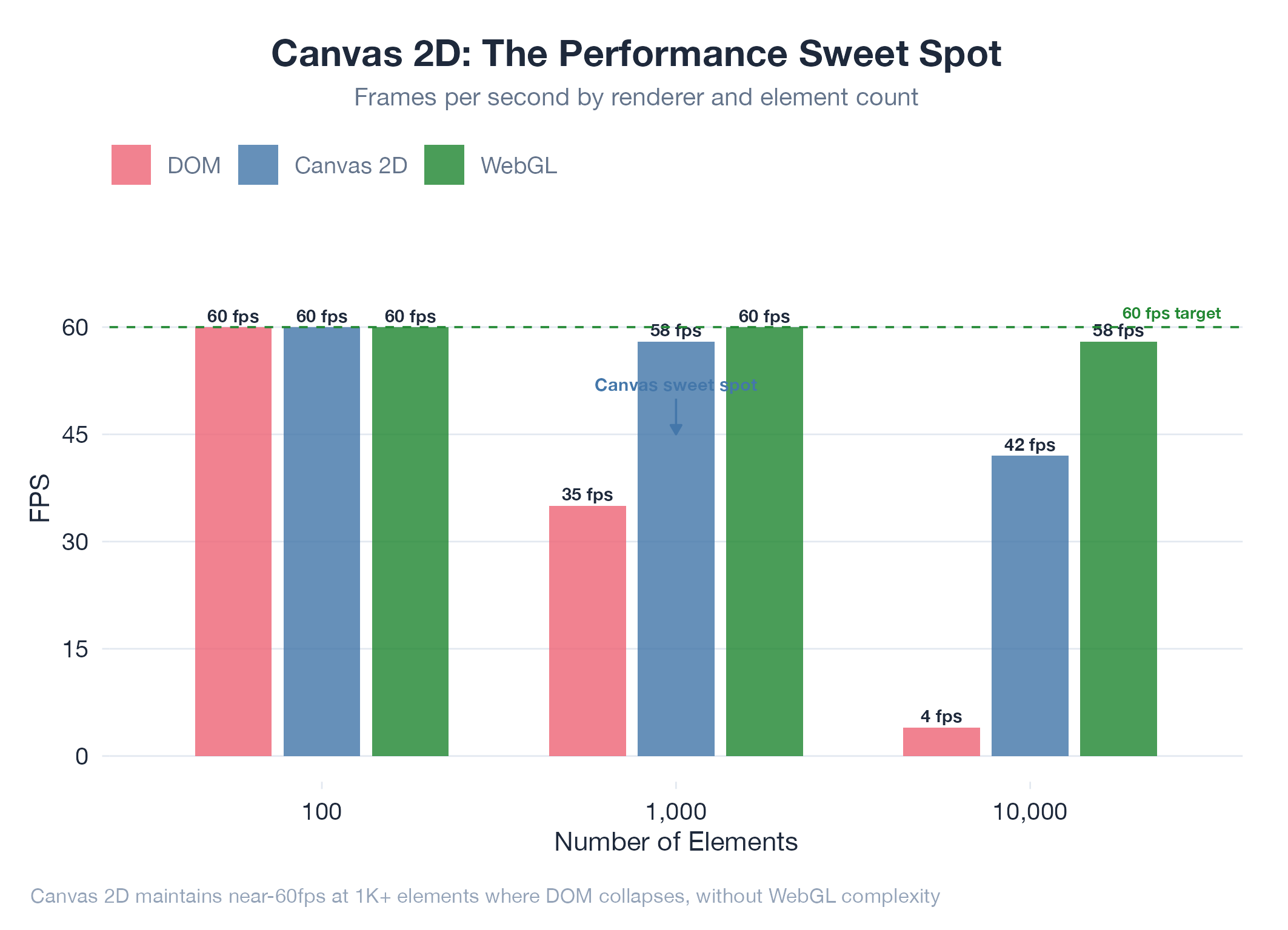
The HTML5 Canvas 2D API gives you a blank rectangle of pixels and a set of drawing commands: lines, rectangles, arcs, text, images. Unlike DOM-based rendering, canvas is immediate-mode: you issue draw commands, pixels appear, and the canvas forgets what you drew. Want to animate? Clear and redraw each frame via requestAnimationFrame. This makes canvas ideal when you need precise control over every pixel and DOM layout gets in the way: data visualizations with tens of thousands of data points, games with tile-based grids, and procedural graphics.
How It Works
canvas.getContext('2d') → draw with methods like fillRect, strokePath, drawImage → schedule redraws with requestAnimationFrame. Performance tricks: dirty rectangle tracking, offscreen canvas for static layers, quadtrees for hit testing.
Example
BloomNet uses Canvas 2D for its botanical garden dashboard: procedural L-system plants where height maps to token count and branching maps to code complexity. Quadtree spatial indexing enables click-to-inspect on individual plants across thousands of data points: SVG would collapse at that density. Architecture at BloomNet.